R-report Documentation / Build knowledge
Notes
Create and develop block-based notes, organize your workspace, and share or publish deliberately.
Your personal notes
A note is a sequence of editable blocks with a title, optional description, source references, and organization settings. Use it for an original explanation, an imported Open Note, or a Course lesson. Notes can remain private, be shared through a link, or be published in Open Notes through a deliberate visibility choice.
My Notes combines a list for finding material and a detail editor for developing it. Your own notes are editable; another author's published note is a reading surface unless an explicit sharing permission allows editing. Import creates a separate copy when you need full ownership of your changes.
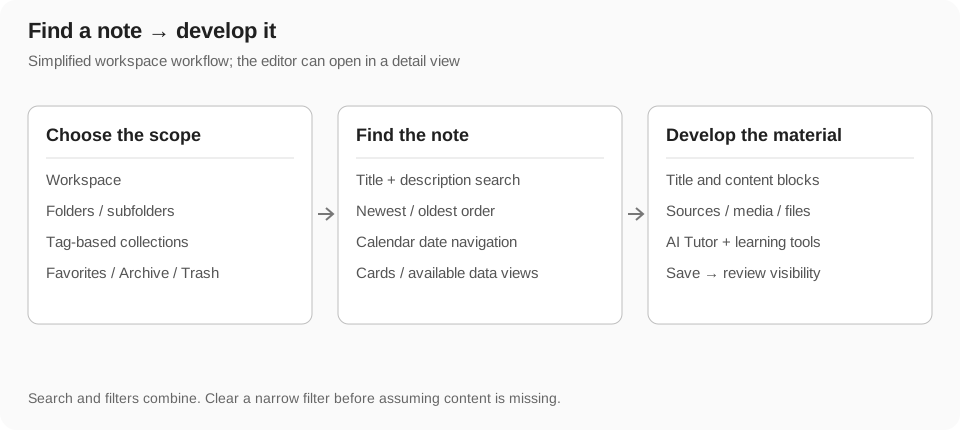
Create and name a note
The destination used to create a note affects where you find it later. A workspace, a folder, and a tag collection are different organization tools. Choosing a filtered view does not necessarily move existing notes into a new location.
- Select a workspace and, if needed, a folder in My Notes.
- Choose the new-note action and wait for the note to open.
- Enter a title that identifies the subject and purpose; add a description when it helps preview the material.
- Write a short outline before adding complex media or learning activities.
- Check that the note appears in the intended destination after saving.
Write with blocks
Each block contains one content unit. Text holds paragraphs; headings mark structure; bullet and numbered lists group related items; to-dos track tasks; quotes and callouts distinguish a passage or reminder; dividers separate sections. Choose a type that communicates the role of the content, rather than relying only on visual formatting.
Use the insertion or block-type controls offered by the editor to add or convert a block. Type into the focused block and use the block menu for actions that apply to the whole item. A text selection and a block selection serve different purposes: text formatting affects selected text, while moving or deleting a block affects the block's entire content.
Keyboard editing and undo
- Enter creates or splits content according to the current block type and cursor position. Lists and headings can have different boundary behavior from plain paragraphs.
- Backspace at the beginning of a block can merge or change the boundary. Use ordinary text deletion within a block when you only want to remove characters.
- Undo and redo recover supported editing actions. Check the result after a structural change such as a split, merge, or conversion.
- Formatting controls operate on the selected text; choose the offered bold, italic, strike, link, or inline-code action when appropriate.
- On mobile, use touch selection and the mobile action controls. Avoid treating a scroll gesture as a desktop drag.
Move, select, and organize blocks
Use block handles and supported drag controls to move material into a clearer order. Check the insertion position before dropping. Where multi-block selection is offered, inspect the selection before applying a bulk action so that unrelated text is not moved or deleted.
Columns place related blocks side by side; their width and arrangement are presentation settings, while the underlying content remains individual blocks. A page block can organize deeper content through the offered page behavior. Prefer a single readable column on narrow screens and use headings for a predictable outline.
- Identify the blocks that belong together and select them through the editor's controls.
- Move them to the intended section or column using a supported handle or menu action.
- Inspect the order and layout after the move, especially on a smaller screen.
- Undo immediately if the result does not match your intent, then retry with a smaller selection.
Tables, toggles, and structured text
- Tables compare items with clear row and column labels. Use table controls to edit the structure rather than spacing text by hand.
- Toggle blocks keep a section's content available while reducing visual density. Check collapsed content before publishing a note.
- To-do and progress-related blocks represent tasks or completion values; they are distinct from the whole-note learning stage.
- Callouts draw attention to a definition, caveat, or next action. Keep them focused so the main explanation remains easy to read.
- Lists work best when their items share the same purpose. Use numbered items when the sequence matters.
Add references, images, and files
Use the appropriate block or upload control to add a supported source. Images provide visual context; bookmarks preserve external references; file blocks attach documents and other supported files. Library indexes available references and note files so you can find them outside the editor.
A link, an uploaded file, and an image are not interchangeable. Adding a URL does not guarantee that every external page is retrievable by AI, and uploading a file does not automatically turn it into editable paragraphs. Use the relevant analysis or conversion action when it is offered.
- Choose a block type suited to the source, then supply its URL or upload the file through the offered control.
- Wait for the upload or preview to finish before leaving the note.
- Check the rendered item and keep a short explanation of why the source matters.
- Review whether the attachment can be accessed by the audience before sharing or publishing.
Video, audio, and source-based notes
Supported media blocks include YouTube or video, audio, podcast, and voice/transcription-related material. Play the source with its own controls, add surrounding explanations, and use source-aware AI actions where available. A transcription or generated note should be checked against the original audio or video.
Study view keeps a supported source video visible in a movable panel while you read or use AI. Opening it changes the viewing layout, not publication or mastery. External media may be restricted, removed, or blocked by the browser; keep source links and attribution so you can return to the original.
- Use text around a media block to identify the question you are investigating.
- For a long source, focus AI on the relevant segment or available transcript rather than expecting a perfect whole-source answer.
- Review timestamps, names, numbers, and quotations in generated source notes.
- Voice and screen-capture entry points have their own permissions; check recording state and wait for processing before closing.
Draw and create visual learning material
Drawing and diagram blocks help represent a structure that is difficult to explain in prose. Use the offered drawing canvas or AI diagram tools, then inspect labels, connections, and layout. Maps provide geographic context through supported location controls; they are different from concept maps.
Presentations, infographics, concept images, and video-lesson blocks can make a note more visual when those tools are available. They may involve generation and additional usage. Keep a text explanation alongside important visuals so that the note remains understandable when an embed cannot load.
Use AI Tutor while editing
AI text in a conversation is not necessarily part of the note until you insert or save it. A generated replacement, an additional block, and a personal copy are different outcomes. Use the AI Tutor guide for context, source access, conversation history, dictation, and credit rules.
- Open AI Tutor and choose Page scope or select the relevant blocks.
- Check the context and state one task, such as explaining, rewriting, translating, or generating review material.
- Review the response for factual accuracy and fidelity to the source.
- Use the offered insertion or apply control to keep useful material in your note.
- Inspect the resulting blocks and saving state before continuing.
Create summaries, quizzes, and flashcards
Use structured learning blocks to turn reviewed content into practice. A summary supports review, a quiz tests comprehension, and flashcards practice recall. Generate or edit them through the available controls, then verify the answers and explanations before studying them.
Saved supported learning blocks can appear in Study with their recorded activity. Ordinary prose that happens to contain questions does not necessarily become a tracked quiz. Keep generated blocks focused on the part of the source you understand well enough to review.
Highlights, memos, and annotations
Use the available selection actions to highlight a passage or attach a memo. Choose a short, meaningful selection and explain why it matters instead of highlighting an entire page. A memo is distinct from a public comment or an AI conversation.
Study's Annotations view collects accessible saved highlights and memos with their note context. Open an annotation there to return to its source note. Reader surfaces can also show published highlight or memo content when present; edit permissions depend on ownership and the viewing surface.
Read aloud and learning stages
Read aloud plays readable note text in a floating player. Choose a selected readable block or the available page action. Cached audio is reused; generating missing audio requires eligible access and consumes usage. Stop keeps the player open, while Close dismisses it.
The graduation-cap control records your whole-note stage through Not started, Learning, Reviewing, and Mastered. It is a self-assessment, separate from a task checkbox, a quiz score, and the source video's Study view. Recorded stages help you return to a note in Study.
Autosave and changing devices
The editor saves content and note settings as you work. Wait for ongoing save or upload activity to finish before closing a newly edited note, refreshing the page, or switching devices. Large media uploads and generation can take longer than ordinary typing.
Do not assume the app is a fully offline editor or that simultaneous edits on multiple devices will merge every change as you expect. If connectivity or authorization fails, preserve the current content, restore access, and check the saved note before replacing it with another version.
- Check the actual saving/error state rather than treating a toast or navigation as proof that every upload finished.
- Avoid editing the same note simultaneously in several tabs when consistency matters.
- Use undo promptly after an unwanted edit; reopening the page is not a substitute for undo.
- If an error persists, copy unsaved important text before attempting a reload.
Choose a workspace and folder
A workspace separates sets of personal material. Folders organize notes inside the selected workspace, including nested folders where supported. Choose the workspace first, then select a folder to inspect or create its notes. Moving a note changes its organization; it does not publish it.
The include-subfolders option changes which notes you see. With it enabled, a selected folder can include descendant-folder notes. With it disabled, the view is narrower; in the all-notes context it can show only notes with no assigned folder. Check this setting when something appears missing.
Find notes with search and sorting
My Notes search matches the loaded note title and description. Workspace, folder, collection, and dedicated view filters combine with it. It is not the same search as Open Notes metadata search, Library reference search, or AI conversation search.
Choose newest or oldest order to sort by creation date. Selecting a calendar date helps jump toward notes created nearest that day; it is not necessarily an exact one-day-only filter. Review the active controls before assuming that a note has been deleted.
- Select the correct account, workspace, and folder or all-notes view.
- Enter a distinctive title or description keyword.
- Clear collections or dedicated filters if the result is too narrow.
- Check include-subfolders and sort/date controls, then open the note you need.
Use tag-based collections
A collection groups notes through tag rules rather than moving them into another folder. Choose the collection's tags and whether notes must match all tags or any tag. A note can meet several collection rules without being duplicated.
For example, an any-match collection can gather notes tagged with either a subject or project, while an all-match collection requires every chosen tag. Keep tag spelling consistent and check the rule if a note does not appear. Updating tags changes membership automatically in the filtered collection.
Favorites, bookmarks, and archive
Use a favorite for quick access, a folder for location, a collection for tag rules, and Archive for inactive material. These tools solve different organization problems.
- Favorites: mark your own frequently used notes to find them in the Favorites view. A favorite is not publication or a study stage.
- Bookmarks: where the bookmark folder is available, it provides a saved-note browsing context. Inspect the item to see whether it is a public source or an owned copy.
- Archive: move inactive notes out of normal note lists without treating them as permanently deleted. Archived notes are reached through the dedicated Archive view.
- Return to active work: use the available unarchive control and check the destination view. Ordinary search and Favorites can hide archived notes.
Layouts and data views
Available card layouts change how previews and metadata appear; they do not alter the note's content. Dedicated data views present particular sets of items or metadata. Switch to a view that helps the current task instead of relying on one large unfiltered list.
Selection actions can differ between card lists, dedicated data views, and Trash. Check the view and selected items before using a bulk action. A view is a way to inspect material, not a separate copy of every note shown there.
Move and manage several notes
- Enter selection mode in a supported note list or data view.
- Select only the intended notes and inspect the selection count.
- Choose a supported action such as Move, Archive, or Delete.
- For Move, choose the destination workspace and folder and review them before confirming.
- Wait for completion and inspect the result. If the operation reports partial failures, review the remaining items before retrying.
Trash, restore, and permanent deletion
Delete sends supported notes to Trash. Open Trash to inspect deleted material and use Restore for items you still need. Permanent deletion is a separate action and should be treated as final; do not use it merely to hide a note from the current list.
Archive and Trash are different states. An archived note belongs in Archive; a deleted note belongs in Trash. Restoring a note does not necessarily remove an unrelated search, folder, or archive filter, so clear filters if the restored item is not immediately visible.
- Check the note title and selected items before deleting.
- Use Trash to recover an accidental deletion through Restore.
- Review the result in the relevant workspace or folder.
- Use permanent deletion only after checking that no needed material remains in the selected items.
Import, copies, and Course lessons
Imported Open Notes are personal copies with a relationship to the public source. They are not continuously synchronized with the author. Course lessons are notes connected to course metadata and a lesson sequence; changing a lesson's blocks does not automatically redesign the course plan.
Keep copied material in a clear folder, preserve attribution, and use collections when the same subject spans several folders. If you need a recurring learning sequence rather than a group of files, use Courses rather than duplicating the same organizational structure by hand.
Troubleshoot organization and saving
- Cannot find a note: check the signed-in account, workspace, folder, include-subfolders option, collection rules, search, Archive, and Trash.
- Collection membership seems wrong: compare the note's tags with the collection's all/any rule.
- Calendar results include other days: the calendar can prioritize nearby creation dates instead of restricting the view to exactly one day.
- Move only partly succeeds: inspect which items remain and retry those after resolving the error.
- An import differs from the source: copies do not automatically merge author updates.
- Saving or uploads fail: preserve important current text and resolve the connection or session error before refreshing.
Private, link-shared, and published notes
A private note belongs in your personal workspace without public access. Link sharing provides a share URL for readers with the link. Open Notes publication makes the note public through the discovery and reading surfaces. These are different visibility modes; a URL in your address bar is not proof that another person can access a private note.
The sharing controls can switch between link sharing and Open Notes publication rather than maintaining both links as interchangeable access methods. Check the resulting mode and copy the current URL after a change. Do not reuse an old token link without verifying that it still works.
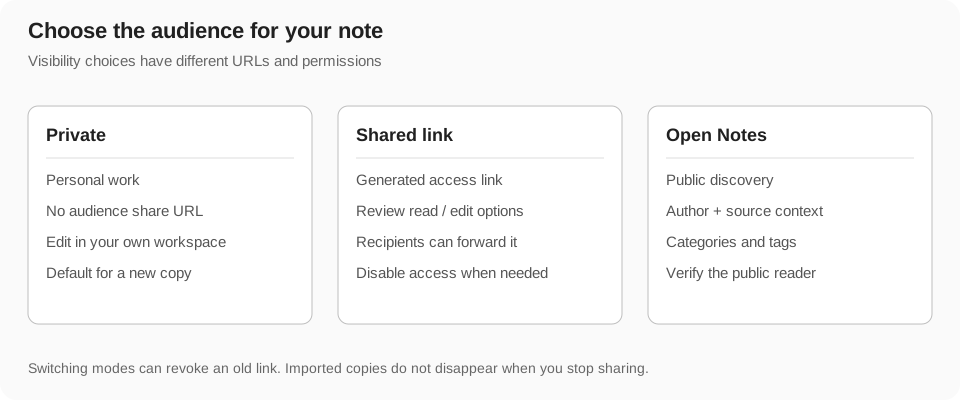
Publish an Open Note
Publication is a visibility change, not a substitute for content review. Generated tags, text, and images should be checked before you make them public. Private comments, personal details, or source material you cannot redistribute should not be included by accident.
- Review the note's title, description, all blocks, media, and source attribution.
- Choose Open Notes/public publication in the sharing controls.
- Select the available category and subcategory and review discovery tags.
- Wait for the settings to save, then open the resulting public URL.
- Inspect the public rendering and links, including any collapsed content or attachments.
- Share that public URL when you want others to discover or read the published version.
Update or stop sharing
An edit to a published note can affect what public readers see after saving. Review the live version after a significant change. Use the visibility controls to return to private or change the sharing mode when appropriate.
Disabling access does not retract copies, screenshots, newsletters, or text already saved by someone else. An imported copy is independent. If you correct a public source, readers may need to revisit it and update their own material manually.
Attribution and imported versions
Keep the original source and author context when developing an imported note. Explain what you added, corrected, or reorganized rather than presenting a copied explanation as an original source. Your personal copy can remain private while the source stays public.
Publishing your developed copy is a separate action from Import. Author updates and newsletter subscriptions do not merge source changes into your note. Check the public source when you need its latest version.
Social sharing and generated drafts
The sharing panel offers supported social destinations and URL copying. A social action can open another service or copy a prepared message. Review the text and destination before submitting it through that service.
AI-generated share drafts help adapt the note for a destination, but are still drafts. Check the summary, claims, and public URL. Draft generation can consume usage; it does not guarantee that a social post was sent or that every recipient has read the note.