R-report Documentation / Build knowledge
AI Tutor
Ask questions, analyze sources, develop notes, and create learning material with the right context.
What AI Tutor does
AI Tutor helps you understand sources, develop explanations, and create learning material in context. Use it inside a personal note, a public Open Note, or a supported course-editing flow. These surfaces differ in what they can save: a public reader cannot silently rewrite an author's note, while your own editor can insert or apply results through its controls.
- Ask questions and discuss the meaning of a passage.
- Summarize, translate, rewrite, expand, or review material through the offered actions.
- Analyze supported video, image, or audio context when the source can be retrieved.
- Generate quizzes, flashcards, summaries, diagrams, presentations, and images when available.
- Revise a course goal and lesson plan in the course editor without changing a shared template source.
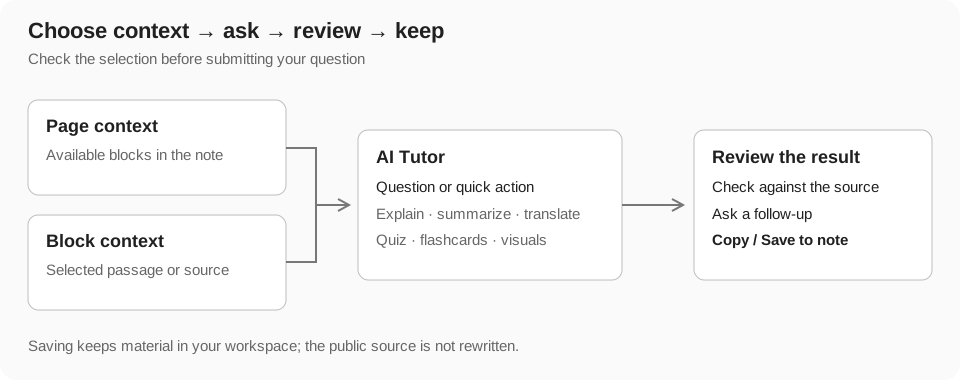
Choose Page or Block context
Page scope uses the available page content. Block scope uses the selected block or blocks, helping isolate a passage, source, or study activity. Inspect the context preview and remove irrelevant selections before submitting. An empty block selection can fall back to page context.
Selecting one short passage is usually better for explaining a difficult sentence; page scope is more useful for a comparison or overall summary. Context is bounded, so a long page or conversation does not guarantee that every detail will be considered in every response.
- Open AI Tutor from the note or a supported block action.
- Choose Page or Block and inspect the selected context.
- State what you want the answer to accomplish and its desired format.
- Submit, compare the response with the source, and use a follow-up for remaining uncertainty.
Write an effective request
Provide a target audience, scope, length, and constraints when they matter. Request citations or source links for claims that need verification, then open them yourself. A generated citation can be incorrect or irrelevant; source review remains part of the workflow.
- Explain: 'Explain this passage for a beginner, then give one practical example.'
- Compare: 'Compare these approaches by assumptions, strengths, and tradeoffs.'
- Summarize: 'Extract the main claim, supporting evidence, and unresolved questions.'
- Develop: 'Expand this outline into a clear explanation while preserving the source's uncertainty.'
- Practice: 'Create five questions that test the concepts rather than isolated wording.'
- Verify: 'Separate statements supported by this material from assumptions or missing evidence.'
Prompt controls and dictation
Enter submits a prompt; Shift+Enter adds a line break. You can also use the send button. While generating, the input can be read-only and the send control can become a stop control. Use Stop to interrupt a request where offered; closing the panel is a separate layout action.
The microphone dictates speech into the prompt on supported browsers. Allow microphone access, speak while the listening indicator is active, then stop dictation and correct the recognized text before sending. Recognition uses the browser's language setting. It does not create a source recording or automatically submit every spoken phrase.
Questions, rewriting, and development
Use ordinary questions to discuss material. Use an explicit rewrite, expand, improve, or note-generation action when you want a transformed artifact. The same sentence can be used differently depending on the action and context selected, so inspect the toolbar choice before submitting.
In your personal editor, review where a generated result will be inserted or applied. Keep the original passage when comparing alternatives and use undo or the editor's available result controls if the transformation does not help. In the public reader, results stay in the sidebar until you copy or save them through a personal workflow.
- Select the source passage or use Page for a whole-note task.
- Choose an offered action or describe a focused transformation.
- Review meaning, terminology, and any facts added by the response.
- Insert or apply the useful result only through the editor's available controls.
- Check the resulting note and saving state before leaving.
Translate material
Choose the translation action and target language when offered. It uses the selected material or page context, depending on scope. Translation is generation, with its own usage rules; it is different from changing the application's display language in Setting.
Review names, technical terminology, units, quotations, and the source's tone. A fluent translation can still change meaning. Keep the original nearby when precision matters, and clarify whether a follow-up should translate literally or adapt the explanation for a particular audience.
Work with videos and other sources
Video quick actions include making a note, extracting key points, and requesting timestamps. Select the video block so the request has the intended source. Available transcripts and source information support analysis, but inaccessible, restricted, or transcript-poor videos can produce incomplete results.
Image context can support description or text extraction; supported audio and podcast blocks offer their own analysis actions. A source URL is not equivalent to supplying its entire contents. When retrieval fails, paste a relevant passage, choose another source, or ask a question limited to the visible note.
Use web-backed questions deliberately
The personal-note AI flow can distinguish requests that explicitly call for web search from ordinary text questions. Ask clearly when you need outside sources, current information, or a comparison beyond the note. Review returned links and dates rather than assuming all answers are current.
External search is a separate metered action and is not covered by an ordinary text-Q&A exemption. It also does not turn the note search field into web search or guarantee access to a paywalled source. For a source-grounded explanation, identify which parts should come only from the note.
Create summaries and review cards
A plain text summary in chat and an interactive summary block are different outputs. A structured block can participate in Study; copying text alone does not guarantee it becomes a tracked study activity.
- Choose reliable page or block context and request a summary or summary card.
- Choose a list or callout format if the action offers variants.
- Check whether the summary covers the main ideas without introducing unsupported facts.
- Save useful material in your own note and use the structured summary's review controls when present.
Generate quizzes and flashcards
Quizzes test your ability to answer questions; flashcards practice recalling a prompt's answer. Generate them from reviewed material, specify the desired difficulty or scope, and inspect the output before trusting it. Questions based on flawed context reproduce the same flaws.
- Quiz: attempt the answer before looking at feedback. Check answer choices and explanations against the source.
- Flashcards: keep each card focused on one concept and recall the answer before revealing it.
- Selected study context: when a block or result offers an AI discussion action, ask about that activity and verify the item shown in context.
- Persistence: keep a generated activity through the available personal-note save or insertion controls when you want to revisit it in Study.
Generate diagrams, presentations, and images
These outputs can have different latency and credit costs from text chat. Wait for completion and inspect the actual result before saving or sharing it.
- Diagram: represent relationships or a process. Choose a flow diagram when order matters and a mind map when grouping ideas matters.
- Presentation: arrange the material into slides. Review the sequence and coverage, then inspect each slide's claims.
- Infographic: create a visual explanation in an offered style. Check labels, numbers, and embedded text; generated images can contain mistakes.
- Concept image: illustrate an idea when that action is available. An illustration is not evidence for a factual claim.
- Follow-up refinement: select the relevant generated result when supported and describe the correction you want. Confirm whether the result replaces, revises, or creates material through the offered control.
Conversation history and search
Start a new conversation for a different learning goal. Reopen available note-associated history to continue an earlier discussion. Search in the AI panel filters messages in the active conversation; it does not search every conversation, source transcript, or personal note.
Follow-ups can use recent conversation context, but history is bounded. Restate an important constraint or reference if a later answer appears to lose track. Do not assume a course editor's local AI conversation survives closing the course dialog.
Save results without changing the source
In a personal editor, use the available insert or apply controls to keep reviewed results. In Open Notes, Copy transfers text to the clipboard, while Save to note opens the personal-save or Import workflow. Confirm the destination workspace and folder before finishing.
Neither a public-reader AI question nor a personal save rewrites the author's public note. Import creates an independent personal copy. Saving a result, publishing your copy, and commenting on the source are separate actions with different audiences.
AI personalization and course assistance
Eligible accounts can control AI personalization in Setting. When enabled and relevant to a request, personalization can use accessible personal-note context to help with earlier ideas or writing preferences. It is not a promise that every private note is read for every answer. Turning it off does not remove the explicit page or block context you selected.
Course AI works on the open course draft's supported fields, including its goal, writing rules, and plan. Apply changes, review them, and explicitly save the course. Source templates remain references; AI assistance in this dialog does not modify the template note or already generated lesson notes.
Credits, access, and limits
AI access depends on sign-in, active plan, remaining usage, and rate limits. Ordinary text Q&A in a personal note can have a plan-specific credit exemption. That does not make web search, video analysis, translation, image generation, or Study Tools free. Public-reader and generic generation flows can have different rules.
Guest requests are limited and may ask you to sign in. Long sources and complex outputs can take longer or consume more usage. Check Plans for the current allowance and the action's prompt for any specific restriction; this guide deliberately avoids fixed prices or model guarantees.
Troubleshoot AI responses
- Wrong context: switch Page or Block, clear old selections, and select the intended source again.
- Unhelpful answer: narrow the goal, specify audience and format, and ask one question at a time.
- Missing source: supply accessible text or another reference; do not assume the model read an unavailable link.
- Generation blocked: inspect authentication, active plan, credit balance, and the rate-limit message before retrying.
- Incomplete result: review what completed and retry only the missing task. Stopping a request does not guarantee a complete artifact.
- Unsaved result: check whether it is merely in chat or was inserted/saved to a personal note.
- Unexpected transformation: compare with the source and use the offered undo or result controls. Preserve valuable original text before a large rewrite.