R-report Documentation / Build knowledge
Courses
Discover courses or create a learning path with plans, templates, lesson generation, and progress.
Learn with a structured course
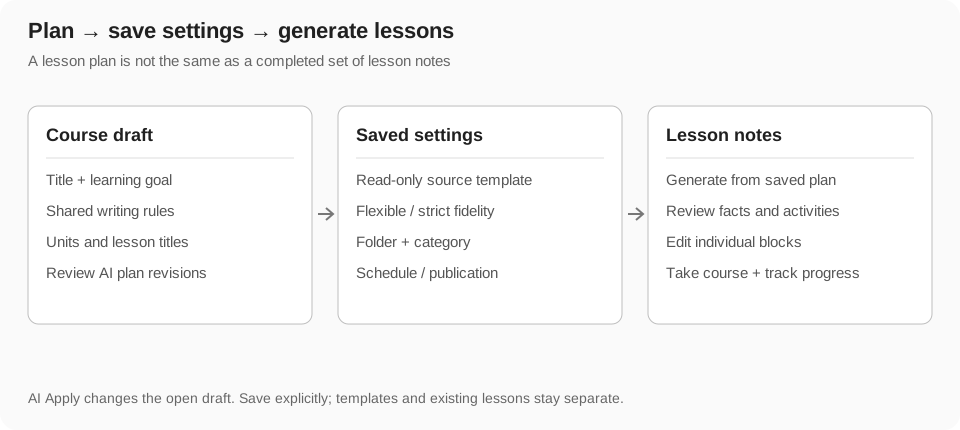
A Course organizes lesson notes around a learning goal. The course holds its title, goal, writing guidance, lesson plan, and generation settings; each generated or linked lesson is a note with its own blocks. A course plan and a fully generated set of lessons are different stages of the workflow.
Use the course catalog to discover material, your taking-course view to continue learning, and your created-course area to manage courses you own. Reading or taking another author's course does not grant permission to redesign that author's course.
Browse and search courses
Course cards show available title, description, creator, preview, lesson count, and learning-related information. Catalog search matches the loaded course title, description, and creator name. It is not a full-text search of all lesson bodies.
The taking-course view filters to courses you have enrolled in. Open a course card to inspect its lessons and sources before deciding to take it. An empty filtered catalog can mean that your keyword is too narrow or that you have not taken a course yet.
- Open Courses and choose the catalog or your taking-course view.
- Search a subject, title, or creator name.
- Inspect the description and lesson list to check scope and level.
- Use the take-course action where offered, then continue in the course study view.
Take a course and continue later
Taking a course adds it to your learning context. Its study page presents available lessons and progress, and can identify the last lesson studied. Enrollment is separate from importing individual notes into your workspace.
Within a course, use unit and lesson navigation to move through the material. The sidebar groups lesson titles into units that can be expanded or collapsed. Open a lesson to read its blocks and use the available AI or course panel alongside it.
Create a course from a learning goal
A focused goal helps avoid repetitive lessons. Specify what learners should be able to explain or do at the end, rather than only naming a broad topic.
- Open your course creation or management area and choose a new course.
- Enter a clear title and a goal that identifies the learner, intended outcome, and scope.
- Add writing rules such as prerequisites, tone, lesson structure, or required practice.
- Choose the desired lesson count, or the offered open-ended setting when appropriate.
- Generate or write a plan, then review units and lesson titles before saving.
- Choose organization and publication settings deliberately; creating a course is not the same as reviewing every generated lesson.
Use a note as starting material
A creation flow can use an existing note as a starting source or link an existing lesson note when offered. Confirm which note is the source and which entries are lessons. A source reference can inform course generation without being rewritten by the course editor.
The initial Study Tools course wizard asks for the title, learner/goal/scope, shared lesson-writing preferences, and lesson count. It creates a one-time course; template selection and automatic scheduling are later course settings rather than mandatory wizard questions.
Review and edit the lesson plan
The plan describes unit grouping and the ordered lessons you intend to teach. Check the progression from prerequisites to advanced topics, remove overlap, and give each lesson a distinct purpose. Use the plan editor's available add, edit, remove, and reorder controls.
Plan generation may provide quality feedback that needs review. Existing linked lessons and already generated lesson notes are separate from planned titles; changing the plan does not automatically rewrite every generated note.
- Check each unit's purpose and whether the lessons build on one another.
- Edit vague lesson titles and fill required unit or lesson fields.
- Reorder or remove redundant entries through the offered controls.
- Inspect linked or generated lesson status before replacing entries.
- Save the reviewed course before generating a lesson from it.
Choose a reference template
A reference template supplies structure for generated lessons. Select an available source note or another offered template through the picker, then inspect what it contributes. The template is shared reference context and remains read-only in course setup.
Flexible fidelity preserves useful structure while allowing a lesson's illustration and presentation to fit its own subject. Strict fidelity follows the recorded template composition more closely. Choose the mode based on your intended teaching format; strict does not mean that copied labels or factual claims are automatically correct.
- Use a template whose blocks model the kind of explanation and practice you want.
- Review images and diagrams in generated lessons for subject-specific accuracy.
- A first-generated-lesson reference is only meaningful once that lesson exists.
- Changing course template settings affects future generation, not an automatic rewrite of earlier lessons.
Revise the course with AI
The course editor's AI sidebar can discuss the current draft and apply supported revisions to title, goal, shared writing rules, template-role guidance, and lesson plan. Page scope addresses the supported draft; block scope narrows changes to the selected logical field or lesson.
Applying a response changes the open draft locally. Review it, use the available undo step if needed, and explicitly save. Course AI does not change ownership, publication destinations, schedule, the template note, or already generated lesson blocks through a plan patch. The dialog's conversation is local; do not rely on it remaining after close.
- Open the course AI panel and identify the field or plan entry you want to revise.
- Ask for a focused improvement, such as reducing overlap or clarifying prerequisites.
- Inspect the proposed or applied changes and undo unwanted changes.
- Save the course when the draft is ready.
Generate and inspect a lesson
AI assistance and lesson generation have their own usage and access limits. A failed settings save should be resolved before generation; a pending plan entry is not proof that a usable lesson exists. Cancelling a template popup does not confirm its proposed generation choices.
- Choose the lesson to generate from the saved course plan.
- Review the template settings shown for that generation.
- Use Save and generate when course or template settings have changed, so generation uses the saved choices.
- Wait for generation and open the resulting lesson note.
- Check the explanations, references, quiz answers, media, and visual labels.
- Edit errors in the note before relying on it or distributing it to learners.
Schedule automatic lesson generation
Eligible courses can enable automatic generation and configure a recurrence through the schedule control. The offered settings support daily, weekly, or monthly patterns with their associated interval, day, and time choices. Review the schedule summary and any time-zone information shown before saving.
Automatic generation is subject to current quotas and access. It continues from saved course settings; changing an unsaved draft is not enough. Disable automatic generation when you want manual control. A schedule is separate from a newsletter send time and from the publication setting.
Set category, folder, and publication choices
Course setup offers category/subcategory and destination folder controls where available. Categories help public discovery; folders organize personal lesson notes. Pick the intended destination and check the result after saving or generating.
The auto-publish option determines whether generated lessons are intended for public distribution in the supported flow. It is a separate decision from creating a course or enabling a generation schedule. Inspect a lesson's actual visibility before assuming that the whole course is available to public readers.
Read and search lessons
The course study page can search visible lessons by title, description, preview text, and tags. Lesson order controls can change between oldest and newest creation order, while the course table of contents communicates unit structure. Use the appropriate control for browsing versus following the intended learning sequence.
Open a lesson in the reader to use source playback, available Study view, AI Tutor, and published learning blocks. Use the course panel to continue to related lessons. Your learning state belongs to you; it does not edit the creator's content.
Manage or delete a created course
Open a course you own in management to revise its plan and settings or inspect generated lessons. Changes to future generation settings do not retroactively repair existing lesson content; open the affected notes when you need to correct them.
Deleting a course removes its course record and plan in the current management flow; existing lesson notes are retained as notes. Review the deletion prompt and check your note workspace afterward. Deleting a course is not the same operation as permanently deleting its lesson notes.
Troubleshoot courses
- No courses in your taking view: take a course or clear the current search.
- Planned lessons are missing: inspect whether they have been generated, linked, or published; a plan title alone is not a note.
- AI revisions disappear after closing: apply changes to the draft and explicitly save before closing.
- A lesson repeats the template too literally: review the template and fidelity mode, then generate with the intended saved settings.
- Scheduled generation does not run: check whether it is enabled, saved, due, and within current access or quota.
- A public reader cannot see a lesson: inspect that lesson's actual publication state and URL.
- Lesson content is inaccurate: correct the note and refine future generation rules; do not treat the plan's quality feedback as a guarantee of every block's accuracy.