R-report Documentation / Workspace
Library
Find references, attached note files, and glossary terms with section-specific search and filters.
Find sources, files, and terms
Library is an index of available references, attached note files, and glossary terms. Use it when you remember the source or concept but not the note that contains it. It complements My Notes rather than replacing the note editor or creating a separate copy of every source.
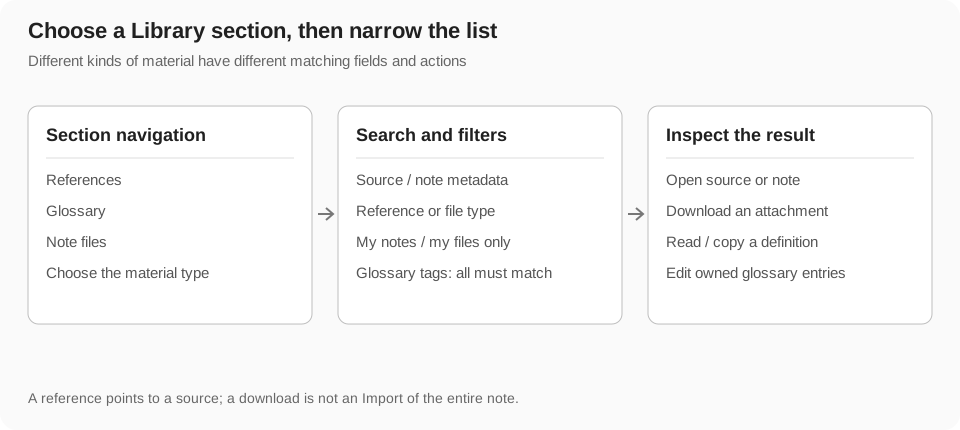
Choose References, Glossary, or Note files in Library navigation. Each section has its own search fields and filters. On smaller screens, open the navigation drawer, choose a section, and close it to inspect the results.
Browse References
References lists indexed sources such as YouTube, images, and other web links associated with accessible notes. A card provides available title, URL or domain, preview, and note context. Open the original source when you need to verify the material; use its note action to return to the connected explanation.
A reference is a pointer, not a guarantee that the external content is available or factually correct. If the source was removed or restricted, the index can still identify what the note originally referenced.
- Choose References and scan the source cards.
- Search by a recognizable title word, URL, domain, or associated note title.
- Select a reference-type filter or the my-notes-only filter when needed.
- Open the source or connected note through the offered action.
Reference search and ownership filters
Reference search matches the loaded reference title, URL, associated note title, and domain, without case sensitivity. The type filter narrows results to the selected source kind. My notes only restricts results to references associated with your notes.
These filters apply together. A domain keyword combined with an image-only filter may exclude the video you were looking for. Clear individual filter chips or reset the filters when the result count looks unexpectedly low. Reference search does not read every external page's full text.
Browse Note files
Note files lists indexed attachments from available notes, such as documents, audio, video, images, spreadsheets, and presentations. Inspect the file type, title, and note context before opening or downloading. File previews vary by format; a preview is not necessarily the whole document.
Search matches the loaded file title and associated note title. Use the file-type filter and my-files-only filter to narrow the list. To add or revise an attachment in a note, return to the note editor and its supported upload controls.
- Choose Note files and search for the file or note title.
- Filter to the relevant type when you know the format.
- Open the connected note to understand how the file is used.
- Use Download when offered and wait for the browser's download or external-file handling.
Download and follow requirements
Downloading a note file requires sign-in in the current Library flow. Your own files, files without a specified author, and files from an author you already follow can proceed through the offered download control. For another author's file, the app can offer Follow and download.
Read that prompt before accepting: it changes your author relationship as well as requesting the file. A download is not an Import of the entire source note. It does not create an editable personal note or automatically merge the file's contents into your workspace.
Browse the Glossary
Glossary stores terms with definitions, optional alternate or translated term text, examples, tags, and author context where present. Use it to revisit a concept across notes instead of repeatedly searching a long explanation.
Open a glossary card to inspect the definition, example, and tags. The detail dialog can copy the term and explanation to the clipboard. Editing and deletion are available only where the account has the required permission; reading a shared term does not make you its owner.
Search and filter glossary terms
Glossary search matches the term, English-term field, definition, and tags. Tag filtering requires all selected tags to be present, so selecting several tags narrows rather than broadens the list. Search and tags combine.
An example sentence alone is not part of the current glossary search matching. If you cannot find a term, try its main spelling, English equivalent, a distinctive definition word, or one tag. Remove extra tag filters before assuming that the entry is missing.
Add a glossary entry
Write a definition suited to your learning context and distinguish it from a copied quotation. A precise short explanation is more useful than a long sentence that introduces several undefined ideas.
- Choose Add in the Glossary section and sign in if required.
- Enter the English-term field and a definition, which are required in the current form.
- Add the optional term text and an example that clarifies usage.
- Enter tags separated by commas; keep spelling consistent with existing entries.
- Save and wait for completion, then inspect the new entry in the list.
Edit, copy, or delete a term
Open a term's detail dialog and use Copy to transfer its text when needed. If you have editing permission, open the edit form, revise the definition or tags, save, and check the updated entry. Editing the glossary is different from rewriting every occurrence of the term in note text.
Deletion asks for confirmation. Verify the selected term before accepting, and do not assume the dialog provides a glossary trash or undo flow. Delete a duplicate only after preserving any useful definition and examples.
Use Library in a learning workflow
- Use My Notes or Open Notes to understand a subject in its original explanation.
- Open Library to find the references or file associated with that material.
- Check the original source for accuracy or additional detail.
- Look up a term in Glossary and copy or add a definition when useful.
- Return to your personal note to connect the source, definition, and your own explanation.
- Create a structured learning activity in the note if you want to practice it in Study.
Filter state and access boundaries
Library only exposes material available through its current access rules; it is not a global search of every user's private files. A my-only filter is a browsing constraint, not a way to grant access. Conversely, clearing it does not make unavailable private material public.
Changing sections can preserve or reset particular controls according to the interface. Check the visible search and filter chips after switching. Counts describe the currently matched loaded results, not necessarily the entire amount of source material in every note.
Troubleshoot Library
- No results: choose the correct section, clear type/my-only/tag filters, and shorten the keyword.
- A glossary term disappears after selecting tags: all selected tags must match.
- An attachment is missing: check that it was uploaded and indexed from an accessible note; a pasted URL and an uploaded file are not identical.
- A source link fails: try the original host or another source; Library does not preserve every external page.
- Download asks you to follow: review the Follow and download prompt before accepting.
- Cannot edit a term: check ownership and permissions, then create your own entry when appropriate.
- A connected note cannot be opened: it may have changed visibility or been removed; use the note's currently accessible route rather than assuming the index grants access.